Guides

How to add a new WordPress admin user?

  • Published
  • 1 min read
  • Wordpress
How to Add a New WordPress Admin User

Log in to your WordPress website.
by visiting www.yourwebsite.com/wp-admin

Once you are login
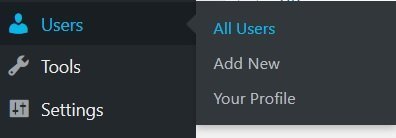
from the left menu click on Users → All Users
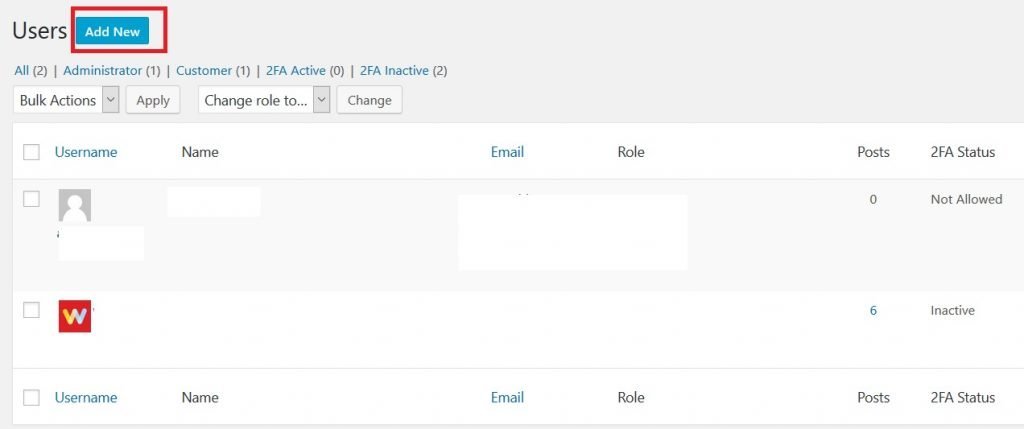
Click on add new
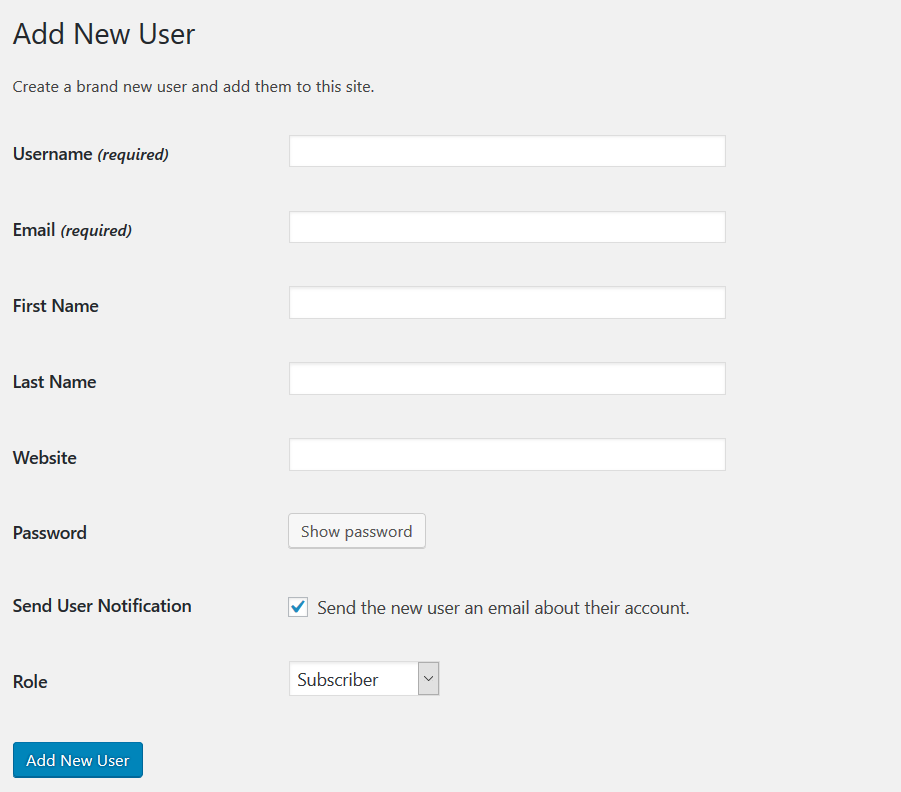
Fill in the form with all the correct info
make sure to change the role to administrator and lastly click on Add new User button and you are done.

Share this article

Written by

Webzstore Team

Webzstore has helped businesses since 2010. Today, we bring websites, digital marketing and enquiry follow-up into practical plans built around the work each business needs.

Related services

Talk about your website or marketing

Book a Free 30-Minute Call

More guides

Guides3 min read

What is WordPress?

WordPress is an open-source CMS (Content Management System) to publish content on the web. It's

All guides

Privacy choices

Choose what this website may load. Your choice is saved on this device for up to 180 days. Privacy Policy

Turning a choice off stops further use of that optional service on this site. It does not take back information already sent, and we cannot delete cookies that other services set in your browser.